Vibe Coding for Small Business: What to Build, and Which Tool to Use
Everything from episode 15 in one place: what vibe coding is, what's worth building for a small business, the ladder from a tool just for you to an app that takes money, and where Claude Code, Lovable and Replit each fit. Then three real builds, each set up from zero, what each costs, where these apps break, the five-minute test, and a free checklist with every request Dana typed, ready to copy.

The phone that won't stop ringing
Monday, seven in the morning, and Dana's phone is already ringing. A homeowner: is the crew still coming Thursday? And which white did she pick for the trim?
By lunch, it's rung eleven times. The same few questions, from eleven different houses. And every answer is on a whiteboard in the van, or in Dana's head.
Her crew lead has a suggestion: vibe code an app. You type what you want, and the AI builds it. He's right that it can. But build what, exactly? With which of the tools everyone keeps naming? And what happens the first time a customer logs in?
Vibe coding, from zero
AI, the kind everyone's talking about, is a program that learned by reading an enormous amount of text, and a lot of that text was code. Ask it something, and it writes back one word at a time, always guessing the most likely good next word. That works for code, too.
Vibe coding means building software by describing it. You say what you want in plain words, the AI writes all the code, and you judge the result by using it, not by reading it. The name comes from Andrej Karpathy, one of the founding team at OpenAI, in a post on February 2, 2025. In November 2025, Collins Dictionary named it its word of the year.
The four parts of every app
Screens
What people see and tap.
Data
What it keeps, like your jobs and your customers.
Logins
They decide who sees what.
Hosting
A computer somewhere that keeps the app running, day and night.
A vibe coding tool can build all four. The real question is which ones you need.
What's worth building
Start with the rule of thumb.
Buy the standard stuff
Payroll, accounting, card payments, email. Other companies have spent years getting those right, and renting them costs far less than building your own.
Build what's shaped like your business
The things no off-the-shelf app quite fits, because they follow the way your business works.
Five kinds that come up again and again
A dashboard
Made from the spreadsheets you already keep.
A tracker
For the things on your shelves, like a bakery's flour, or a salon's hair color.
A form
That asks the questions only your trade asks.
A calculator
That knows your prices.
A customer page
Where customers check on their order, or their job, without calling you.
Two signs something is worth building
You pay for an app and use a tenth of it. Or something important runs on a whiteboard, a spreadsheet, and memory.
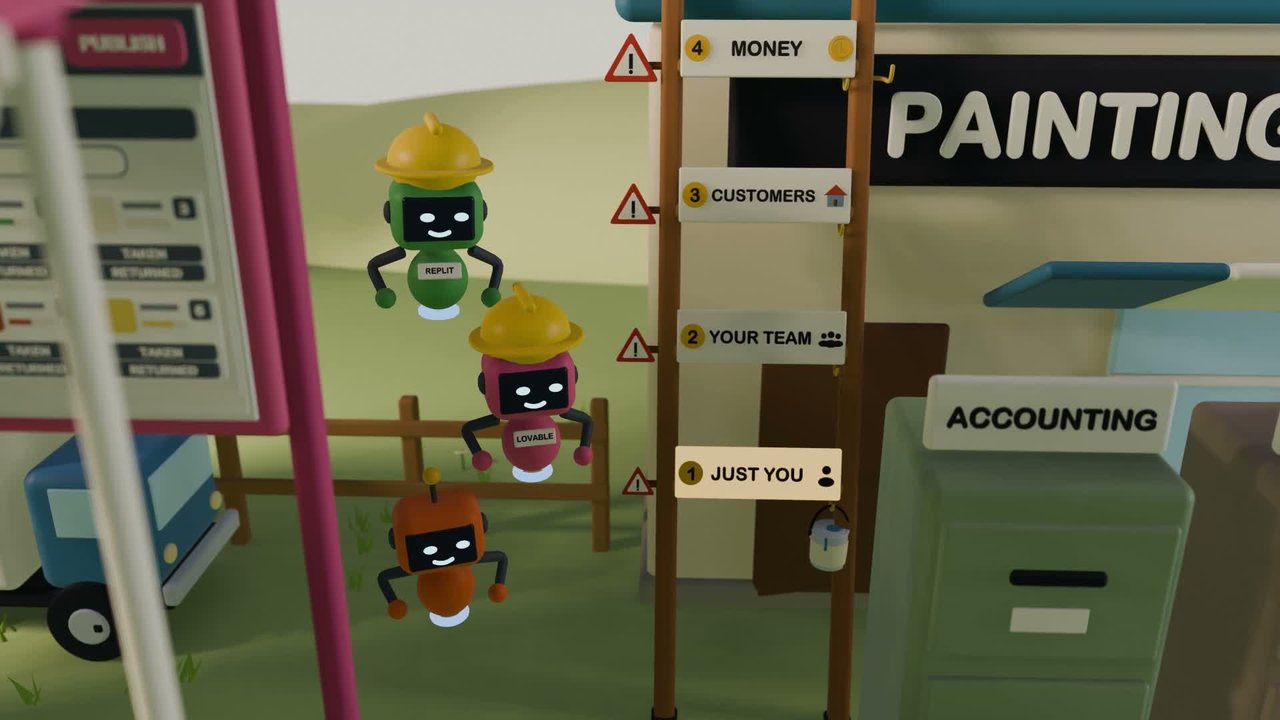
The ladder
What you build decides how careful you need to be.
Just you
A tool just for you, on your own computer.
Your team
Your team uses it.
Customers
Your customers log in and see their own information.
Money
Money moves through it.
Every rung up, the app gets more useful, and a mistake costs more. So start on the bottom rung, and climb on purpose. Dana's three builds go up this ladder, one rung at a time.
Three tools, three jobs
There are dozens of vibe coding tools. For a business, three names come up most: Lovable, Replit, and Claude Code. They overlap a lot, but each one has a sweet spot.
Claude Code
It runs on your own computer, in a folder you choose, with your own files. Nothing goes online unless you put it there. In the desktop app it can start the page it built and show it in a Browser pane, where you click around while Claude checks its own changes.
Lovable
Built to get you from an idea to a good-looking app on the internet, fast. You chat in your web browser, and it builds while you watch. Its built-in cloud adds the database, the logins and file storage for you, with no setup.
Replit
A whole workshop in your browser. Its agent makes a plan, builds the app, and checks the result. In its paid modes it can open your app in a real browser and click around to test its own work. It keeps your test data apart from your real data, and it can build phone apps, too.
So here's a sensible way to split it. Just for you, from your own files: Claude Code. A quick app for your team: Lovable. Something your customers log into: Replit. Any of them can do more, but that's where each one shines.
Claude Code doesn't host apps. Its shareable pages have no backend, and Anthropic's docs say to host a tool with a backend on your own infrastructure. That's one reason it fits the bottom rung so well. Replit's phone apps can be tried on your phone with the free Expo Go app and published to Apple's App Store (with an Apple Developer account); Replit says Google Play publishing isn't supported yet.
Set up Claude Code in 5 steps
First, Claude Code, from nothing.
Install the Claude app
On your computer, go to claude.com/download and install the Claude app. It works on Mac and Windows.
Sign in, on a paid plan
Open it, and sign in or make an account. Claude Code needs a paid plan. The cheapest one that includes it is Pro, at $20 a month, or $17 a month if you pay for the year ($200 up front).
Click Code
It's at the top of the app's sidebar.
Make a folder
Make a folder on your computer, the normal way, and put the files you want to work from inside it.
Open it in Claude Code
Under the message box, choose Local, so it works on your own computer. Then click the folder button beside it, choose Open folder…, and pick that folder.
Prefer the terminal?
You may hear that Claude Code runs in a terminal, a plain window where you type instructions instead of clicking. That version exists too, but the app does the same job with buttons. The one-line terminal install is on episode 10's page.
Build one: the money dashboard, in Claude Code
Rung one. Dana has a question she's never had time to answer: which kinds of jobs actually make her money?
1. Put the files in a folder
The answer is somewhere in her files: a year of quotes, and a spreadsheet of what she spent on paint and labor. She copies both into a folder called Money, and opens it in Claude Code.
2. Ask for the dashboard
Build me a simple dashboard from these files. For every job last year, show what I quoted, what the paint and labor cost, and what I kept. Group the jobs by kind: exteriors, interiors, trim, and decks and fences. Make it a page I can open in my browser.
Claude Code reads the files, and asks one question first: two receipts don't say which job they belong to. Dana answers. A few minutes later, the dashboard opens, right inside the app. If it doesn't open by itself, click Open on the server's card in the chat.
Decks and fences earn the most for each hour of work. Trim earns the least. It took one afternoon, and nothing went online. Her numbers never left her laptop.
Build two: the paint shelf, in Lovable
Rung two: a tool for the whole team. Dana's shop has a shelf of half-used paint cans, and nobody knows what's on it. So the crew buys new paint for touch-ups, while the right color sits on the shelf.
Lovable, from nothing
Go to lovable.dev
Go to lovable.dev and make a free account, with email, Google, GitHub or Apple. You can also type what you want into the box on the front page first: it asks you to sign up when you send it, and keeps what you typed.
Switch the box to Plan
Build is picked by default. Switch it to Plan, so Lovable asks its questions and writes a plan you approve before it builds anything.
Type what you want
Dana's request is below. Lovable asks a question or two, shows its plan, and she approves it.
Watch it build
The first version takes a few minutes. Then the chat is on the left, and the app is running on the right. Ask for changes in plain words.
Publish
Click Publish at the top right, keep or edit the suggested address ending in lovable.app, and click Publish again. Publishing is free on every plan.
With the box on Plan, Dana types:
A paint shelf tracker for my painting crew. Every can has a color name, a brand, how much is left, and which shelf it's on. The crew logs in on their phones, searches by color, and marks a can as taken or returned. Only people I invite can log in.
Lovable added the database and the logins on its own: its built-in cloud is switched on by default, and Lovable adds it to a project when something you ask for needs it. Then she asks for changes. Bigger buttons. A photo of each can.

The app is live, and she invites the crew. Three days later, the crew lead finds two gallons of the exact green he was about to buy.
After the first publish, changes show in the preview right away, but the live app updates only when you click Publish, then Publish changes. Every change is saved as a version you can restore. You own the code, and you can sync it with GitHub on every plan.
Build three: the customer page, in Replit
Rung three: customers log in. This is the one that stops the phone ringing.
Replit, from nothing
Go to replit.com
Go to replit.com. On the front page, a box asks what you'll build. Pick Website, describe your idea, and press Start. Replit says the first one is free.
Make your account
You'll make one along the way.
Pick the Core plan
Core is $20 a month, or $18 a month if you pay for the year, with $20 of credits a month. Plan mode needs Core, and the agent's paid modes, Power and Max, are the ones that can test your app in a real browser (turn on App Testing in the agent's advanced settings).
Ask for a plan first
Click Plan in the chat box, or just ask the agent to plan first. It writes a short plan, and waits for your okay before it changes anything.
Dana types:
A customer page for my painting company. Each homeowner logs in and sees only their own job: the dates, the crew, the colors they picked, and progress photos. I add jobs and photos from an admin page only I can open.
The agent writes a short plan, and waits for her okay. Then it builds. It adds sign-in, so every homeowner gets their own login. And it tests: it opens the app in a browser, logs in, clicks through every page, and fixes what breaks. Dana adds two jobs from the admin page, and checks them on her phone.
Two kinds of sign-in
Ask the agent to "Add sign-in to my app". With Replit Auth, people sign in with a Replit account, on a Replit-branded page. With Clerk Auth, they make accounts inside your own app.
The deposit button
There's one more thing Dana wants: a button, so customers can pay their deposit. Hold that thought. Money is the top rung, and it gets its own rule, in where it breaks.
Test data, real data
Here's a detail that matters on rung three. Every Replit app works with two databases.
Where you build
Dana and the agent build and experiment here, with made-up homeowners. It comes free with every Replit app.
The real customers
Made when you publish, and it holds the live data. Replit says the agent can't touch it. You can still edit that data yourself.
That's a real difference between the tools. In Lovable, the app you're building and the live app share one database. Lovable refuses changes that could break the live app, like deleting a column.
Publishing on Replit
When it's ready, Dana clicks Publish, at the top right. She keeps the address ending in replit.app for now, chooses who can open it, and picks how it runs. When you publish, changes the agent made to the shape of the development database, like a new column, are copied to production.
| How it runs | What it costs |
|---|---|
| Autoscale | $2 a month plus usage. Replit's own example of a small business site comes to about $2.39 a month. |
| Reserved VM | From $15 a month. |
| Static | Free hosting, plus $0.05 per GB sent. |
| Scheduled | $2 a month plus usage. |
Hosting comes out of the plan's monthly credits first. Your own web address can be bought through Replit, or you can connect one you already own.
But before she sends a single invite, there's the test.
What it costs
Checked October 27, 2026. Prices on these tools change often, so check each pricing page before you pay.
| Claude Code | Lovable | Replit | |
|---|---|---|---|
| Free plan | Not included: Claude Code needs a paid plan | 5 credits a day, up to 30 a month | Starter: try it, with 1 published app that goes down after 30 days |
| Paid plan | Pro, $20 a month, or $17 billed yearly ($200 up front) | Pro from $25 a month, or $250 a year (about $21 a month), with 100 credits a month | Core, $20 a month, or $18 billed yearly, with $20 of credits a month |
| Each request | Comes with the plan | About a credit a message: a Plan message is 1 credit, and a build costs more or less with the job (Lovable's examples run from half a credit to 2) | Free Mode costs nothing within your allowance. Paid modes are priced by effort, small changes cost less than big ones, and it asks before it spends |
| Hosting | Doesn't host apps | From your credits. The Free, Pro and Business plans get 20 Cloud credits a month first, and Lovable says hosting costs nothing for most small or new apps | From your credits. Replit's small business site example is about $2.39 a month |
| Your own web address | Not needed for rung one | Pro and up | Buy one through Replit, or connect your own |
So with a paid plan on all three, Dana's builds come to about $65 a month. And rung one on its own is just the $20.
Lovable labels its monthly Cloud and AI grants a temporary offer that may change, and its current Chat-mode pricing runs through October 31, 2026. Lovable's prices here come from its own docs.
Where it breaks
These tools are good. And they break in the same three places.
Logins
An app can look private, and still let one customer see another's job. The screens look right, while the locks behind them are missing. That's exactly what the five-minute test is for.
Changes
Sometimes the AI changes the wrong thing. Both tools keep a history: every Lovable change is saved as a version you can restore, and Replit saves checkpoints you can roll back to in a click. A Replit rollback leaves the database alone unless you tick Database.
Money
Here's Dana's deposit button. The safest setup is a payment page that Stripe hosts, so customers type their card number on Stripe's page, not into Dana's app.
The deposit button, the safe way
Make a payment link in Stripe
In Stripe, make a Payment Link, with no code. It's a payment page Stripe hosts, that you can share as a link.
Have the button open it
Ask the AI to make the deposit button simply open that link.
Lovable can set up Stripe
On Pro or higher, its built-in payments set up a Stripe or Paddle account for you, with a test mode in the preview and real money only after the provider's checks and publishing. Stripe's checkout form sits inside your page. On the free plan, connect your own Stripe account instead, and Stripe Checkout opens in a new tab.
Replit can set up Stripe
On Core or Pro, ask the agent for Stripe. It sets up a Stripe test sandbox with no keys to copy, and you connect your live Stripe account from the Publish pane when you're ready.
The five-minute test
Run it before a single customer logs in. It takes two test accounts and one link.
Make two test homeowners
Ann and Ben, each with a job of their own.
Copy Ann's address
Log in as Ann, open her job, and copy the address from the top of the browser.
Paste it as Ben
Log out, log in as Ben, and paste Ann's address. If Ben can see Ann's job, it isn't ready.
Paste it logged out
Log out completely, and paste it again. If the page opens with nobody logged in, it isn't private.
Change the number
If the address ends in a number, change the number, and see whose job appears.
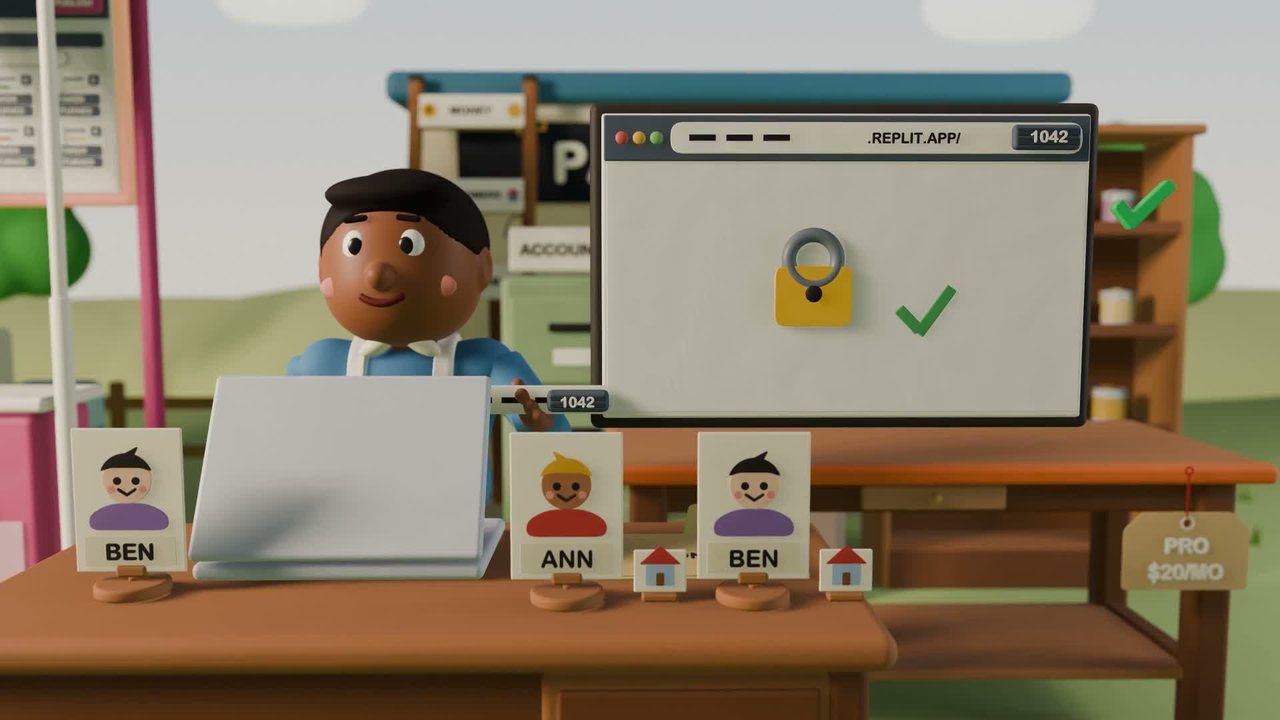
If anything shows up that shouldn't, tell the AI exactly what you saw, let it fix it, and run the test again.
The scans are a good start
Replit always runs a security scan before publishing, with a deeper scan as an option. Lovable runs a free quick scan of your database access rules, about ten seconds, every time you open the Publish dialog. By default, its findings don't stop you publishing.
But only a start
Lovable's own docs say its scans can't guarantee complete security and don't replace a thorough security review, and that you're responsible for your app's security.
Dana runs it on a Sunday night. Ben sees only Ben's job. Then she sends the invites.
Get the free checklist: the ladder, all three setups, and every request Dana typedWhere it stops
These tools take a small business a long way: dashboards, trackers, customer pages, and the small tools around them.
Start on the bottom rung
Start this week, with one question your own files could answer. That's rung one, and it's just the $20.
There's a line
When an app holds lots of customers' private details, takes payments, or has to connect to the systems you already run, like your accounting and your scheduling, it needs someone who knows what happens when it fails at two in the morning.
The free checklist: what to build, and with which tool
The ladder, all three setups, every request Dana typed, ready to copy, and the five-minute test, on one page. Print it, or keep this page open.
Buy it or build it?
The ladder
| Rung | A sensible tool |
|---|---|
| 1. Just you, from your own files | Claude Code. Nothing goes online unless you put it there. |
| 2. Your team uses it | Lovable. The database and the logins come built in. |
| 3. Your customers log in | Replit. Test data kept apart from real data, and run the five-minute test first. |
| 4. Money moves through it | A payment page Stripe hosts, opened by your button. |
Set up Claude Code (5 steps)
Set up Lovable
Set up Replit
Every request Dana typed
Copy them, then swap in your own files, your own trade and your own customers.
Build me a simple dashboard from these files. For every job last year, show what I quoted, what the paint and labor cost, and what I kept. Group the jobs by kind: exteriors, interiors, trim, and decks and fences. Make it a page I can open in my browser.
A paint shelf tracker for my painting crew. Every can has a color name, a brand, how much is left, and which shelf it's on. The crew logs in on their phones, searches by color, and marks a can as taken or returned. Only people I invite can log in.
A customer page for my painting company. Each homeowner logs in and sees only their own job: the dates, the crew, the colors they picked, and progress photos. I add jobs and photos from an admin page only I can open.
Before money moves
The five-minute test
The docs
Each tool's own pages, for the setup and each step.
Sources
Where the facts in the episode come from, checked October 27, 2026. The docs for each step are in the checklist above.
Ready to climb past the top rung?
That's what Benmore's forward deployed engineers do. They build inside your business: they find the work worth automating, and they build it with AI, properly.
Talk to Benmore